
How to Connect Ahrefs API to n8n for Keyword Research Automation
If you are building SEO workflows in n8n, keyword research is one of the best places to start. The process is repetitive, data-heavy, and easy to standardize. You take a seed keyword, pull metrics, filter the list, remove weak ideas, and send the best opportunities into a content queue.
The problem is that most n8n API tutorials stop at the first successful request. They show how to connect an API, but they do not show how to build a workflow that is safe, useful, and ready for repeated keyword research.
That is where an Ahrefs API n8n integration becomes valuable. Instead of exporting keyword data manually from Ahrefs, you can use n8n to pull keyword ideas, clean the response, manage API limits, format the output, and send the final data into Google Sheets, Airtable, Notion, or your own SEO database.
This guide explains the full workflow structure before adding advanced code. The goal is to help you build the system correctly first, then add request bodies, filters, and JavaScript logic after the structure is clear.
This guide is a supporting deep dive for our main guide on building a complete n8n SEO automation workflow. The pillar guide explains the full pipeline from keyword research to WordPress publishing. This article focuses only on the Ahrefs API and n8n keyword research layer.
Quick Answer: How Do You Connect Ahrefs API to n8n?
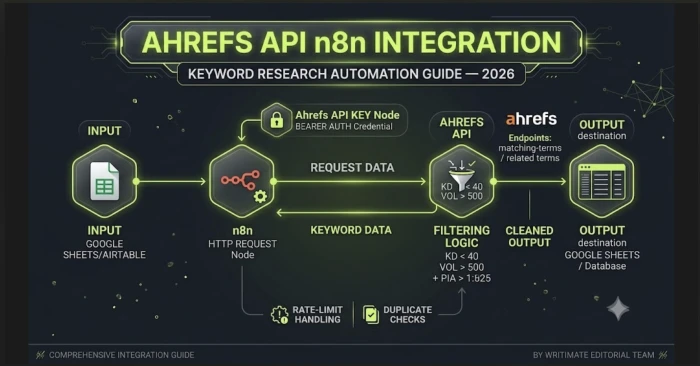
You connect Ahrefs API to n8n by using the HTTP Request node, storing your Ahrefs API key as a secure credential, sending a request to the correct Ahrefs keyword endpoint, and formatting the returned keyword data into usable SEO fields.
A proper setup should also include rate-limit handling, API unit control, duplicate checks, output formatting, error handling, and a clean keyword destination. Without those steps, the workflow may work once but fail when you try to scale it.
Best setup: Use n8n’s HTTP Request node for Ahrefs API calls, Google Sheets or Airtable for keyword output, a duplicate-check step before each API request, and retry handling for rate-limit errors.
Ahrefs API n8n Integration: Best SEO Setup
| SEO Element | Recommended Version |
|---|---|
| SEO Title | Ahrefs API n8n Integration: Keyword Research Automation Guide |
| H1 | How to Connect Ahrefs API to n8n for Keyword Research Automation |
| Primary Keyword | n8n api |
| Exact Long-Tail Target | Ahrefs API n8n integration |
| Secondary Keywords | n8n workflow, n8n workflows, n8n automation, n8n integrations, Ahrefs API keyword research, Ahrefs n8n workflow |
| Slug | /ahrefs-api-n8n-integration/ |
| Meta Description | Learn how to connect Ahrefs API to n8n, set up API credentials, manage rate limits, control API units, and automate keyword research output. |
What This Ahrefs API n8n Workflow Does
This workflow is designed to automate the keyword research layer of your SEO process. It does not write articles. It does not replace strategy. It gives your content system a clean and repeatable source of keyword data.
The workflow should perform these actions:
- Pull a seed keyword from a sheet, form, database, or manual trigger.
- Send the keyword to Ahrefs using the n8n HTTP Request node.
- Collect useful keyword metrics from Ahrefs.
- Format the API response into readable columns.
- Filter out weak or irrelevant keyword ideas.
- Prevent repeated processing of the same seed keyword.
- Save the final output into a keyword research sheet or content queue.
Once this workflow is built, it can support other SEO automations. For example, the output can feed a content brief workflow, a WordPress draft workflow, or a weekly SEO opportunity report.
The main idea is simple: Ahrefs provides the keyword data, and n8n turns that data into a repeatable workflow.
Why Use n8n API Workflows for SEO Keyword Research?
Manual keyword research is fine when you are planning one article. It becomes slow when you are managing a content pipeline.
A typical manual workflow looks like this:
- Open Ahrefs.
- Enter a seed keyword.
- Check matching terms.
- Apply filters.
- Export a CSV.
- Clean unnecessary columns.
- Remove duplicates.
- Prioritize keywords.
- Add approved topics to a content sheet.
An n8n API workflow removes most of this repetition. You define the rules once, then let the workflow run the same process every time.
This is useful for agencies, SaaS blogs, affiliate websites, and content teams that publish regularly. Instead of relying on random exports, you get a structured keyword queue.
The real advantage is consistency. Every seed keyword goes through the same API request, same filters, same formatting, and same output structure.
Ahrefs API vs Ahrefs MCP vs n8n Workflow Template
Before building the workflow, it is important to choose the right integration path. You can use Ahrefs API directly, Ahrefs MCP-style workflows, or an existing n8n workflow template. Each option is useful, but they serve different needs.
| Option | Best For | Skill Needed | Output Control | Recommended For |
|---|---|---|---|---|
| Ahrefs API with n8n HTTP Request Node | Structured keyword research automation | Basic API understanding | High | SEO teams building repeatable keyword workflows |
| Ahrefs MCP in n8n | AI-agent-style SEO research | Intermediate | Medium | Users who want AI-assisted exploration |
| n8n Ahrefs Workflow Template | Fast starting point | Beginner to intermediate | Medium | Users who want a quick example workflow |
| Manual Ahrefs CSV Export | One-time research | Beginner | Low | Small websites or one-off article planning |
For a production keyword research system, the best option is usually the Ahrefs API with the n8n HTTP Request node. It gives you the most control over request structure, fields, formatting, filtering, and output destinations.
Ahrefs API n8n Integration: Requirements Before You Start
Before building the workflow, prepare the basic setup.
- Ahrefs account with API access: Your exact API availability, monthly units, row limits, and endpoint access depend on your Ahrefs plan.
- Ahrefs API key: Store this securely inside n8n credentials.
- n8n instance: You can use n8n Cloud or a self-hosted setup.
- Keyword input source: This can be Google Sheets, Airtable, a form, manual trigger, or database.
- Output destination: Google Sheets is easiest; Airtable is better for content operations; a database is best for custom systems.
- Filtering rules: Without filters, your workflow becomes a keyword dump instead of a decision system.
The final requirement is a clear workflow goal. Are you collecting keyword ideas, building a content queue, refreshing existing keyword data, or feeding a content brief system? The answer changes how you structure the workflow.
Ahrefs API vs n8n HTTP Request Node
Ahrefs API and n8n do two different jobs.
Ahrefs API is the data source. It gives you access to keyword metrics and SEO data through API endpoints.
n8n is the workflow builder. It sends the request, receives the response, transforms the data, and passes it to the next step.
The n8n HTTP Request node is the connection layer between the two. It lets you call a REST API from inside your workflow.
That means your workflow does not need a dedicated Ahrefs node to work. You can use the HTTP Request node as long as you know the endpoint, authentication method, parameters, and response format.
This is why the broader n8n api topic matters. Once you understand how the HTTP Request node works with Ahrefs, you can apply the same structure to other SEO APIs, CRM APIs, analytics APIs, and publishing APIs.
Step 1: Choose Your Keyword Input Source
The first decision is where your seed keywords will come from.
For testing, use a Manual Trigger node. This lets you run one keyword at a time and confirm that the Ahrefs response works.
For a simple production workflow, use Google Sheets. Add seed keywords in one column and let n8n process rows with a “pending” status.
For a team workflow, use Airtable or a form. This lets team members submit ideas without touching the workflow.
For a fully automated setup, use a Schedule Trigger. The workflow can run weekly and process a small batch of pending seed keywords.
A good input sheet should include these fields:
- Seed keyword
- Country
- Language
- Status
- Priority
- Last checked date
- Notes
The “status” field matters because it prevents the workflow from processing everything at once. Use statuses like pending, processed, skipped, error, and approved.
Step 2: Create Ahrefs API Credentials in n8n
Do not paste your Ahrefs API key directly into the HTTP Request node.
Instead, create a credential inside n8n. This keeps the key reusable and easier to manage.
A clean credential setup helps in three ways:
- It protects the key from being exposed inside workflow screenshots or exports.
- It lets you reuse the same Ahrefs connection across multiple workflows.
- It makes key rotation easier because you update the credential once instead of editing every workflow.
Give the credential a clear name such as:
- Ahrefs API — Keyword Research
- Ahrefs API — Production
- Ahrefs API — Test
This may feel minor, but naming becomes important once your n8n account has many workflows and credentials.
Step 3: Configure the n8n HTTP Request Node
After credentials are ready, add the HTTP Request node.
This node should do one job: send the request to Ahrefs and return the response.
Keep the first version simple. Do not start with a large batch of keywords. Test one seed keyword first.
Inside the HTTP Request node, you will configure:
- Request method
- Ahrefs endpoint URL
- Authentication credential
- Query parameters
- Response format
- Timeout settings
- Retry settings
The first successful response is only the beginning. A test request proves the connection works. It does not prove the workflow is ready for production.
Step 4: Choose the Right Ahrefs Keyword Endpoint
Not every Ahrefs endpoint serves the same SEO purpose.
For keyword research automation, you usually need one of these data types:
- Keyword overview data
- Matching terms
- Related terms
- Question keywords
- SERP-level data
- Keyword metrics by country
If your goal is to build an article pipeline, matching terms and related keyword ideas are usually more useful than a single overview response.
If your goal is to validate one keyword before writing, overview data may be enough.
If your goal is to find FAQ ideas, question-based keyword data is more useful.
If your goal is to create a content brief, SERP-level data becomes important because you need to understand what already ranks.
| Workflow Goal | Best Ahrefs Data Type | Why It Helps |
|---|---|---|
| Find new article ideas | Matching terms or related terms | Expands one seed keyword into multiple topic ideas. |
| Validate one target keyword | Keyword overview | Shows whether the keyword has enough demand and realistic difficulty. |
| Create FAQ sections | Question keywords | Finds search queries that can become FAQ answers. |
| Build content briefs | SERP-level data | Helps compare what currently ranks for the keyword. |
| Refresh existing content | Keyword metrics by country | Checks whether a topic still has enough search demand. |
The best workflow may use more than one endpoint, but do not add all of them at the beginning. Start with one endpoint, confirm the output, then expand.
Step 5: Manage Ahrefs API Units Before Scaling
This is the section most basic tutorials miss.
API workflows do not only fail because of bad credentials. They also fail because they consume too much data too quickly.
Ahrefs API usage can depend on the endpoint, number of rows, and selected fields. So a small request can be cheap, while a large request with many rows and fields can use more of your allowance.
To control usage, follow these rules:
- Request only the fields you need.
- Keep row limits small during testing.
- Avoid rechecking the same seed keyword too often.
- Process keywords in batches.
- Log every workflow run.
- Add a monthly usage review.
Do not request hundreds of rows just because the endpoint allows it. For content planning, the top 25 to 100 keyword ideas may be enough, depending on your site size and publishing capacity.
A useful workflow is not the one that collects the most data. It is the one that collects the right data at the right cost.
Step 6: Add Rate-Limit Protection in n8n
Rate limits are normal when working with APIs. Your workflow should expect them and handle them properly.
Ahrefs may return a rate-limit response if requests are sent too quickly. n8n can help reduce this risk with batching, waiting, and retry settings.
A safer workflow should include:
- Small batches of seed keywords.
- A pause between requests.
- Retry-on-fail settings for temporary failures.
- A separate error path for failed keywords.
- A status update after each processed item.
Do not build the workflow as if every request will always succeed. That is fine for a demo, but risky for production.
For example, if your workflow processes 100 seed keywords and request number 12 fails, the whole system should not lose track of the remaining 88. It should mark the failed keyword, continue safely if possible, and give you a clear error record.
Step 7: Best Ahrefs API Fields to Save in n8n
Raw API output is not the same as usable keyword research. Your workflow should save the fields that help with content decisions, not every field available.
| Field | Why Save It? | How It Helps SEO Decisions |
|---|---|---|
| keyword | Main keyword idea returned from Ahrefs. | Becomes the article target or supporting query. |
| volume | Shows monthly search demand. | Helps remove keywords with too little traffic potential. |
| keyword difficulty | Estimates ranking difficulty. | Helps match keywords to your site authority. |
| CPC | Shows commercial value. | Useful for SaaS, affiliate, and lead-generation content. |
| clicks or clicks per search | Shows whether searchers actually click results. | Helps avoid zero-click SERPs. |
| parent topic | Groups related terms. | Helps prevent keyword cannibalization. |
| country | Shows target market. | Keeps research aligned with your audience. |
| last updated | Shows freshness of data. | Useful when refreshing older keyword lists. |
| SERP data | Shows ranking competitors. | Useful for content brief creation. |
For most content teams, these fields are enough to build a strong keyword queue without making the output messy.
Step 8: Clean and Format the Ahrefs API Response
Raw API responses may contain nested fields, extra data, missing values, or names that are not friendly for editors.
Your workflow should clean the response before saving it.
A good keyword output should include:
- Seed keyword
- Keyword idea
- Search volume
- Keyword difficulty
- CPC
- Clicks metric
- Country
- Intent
- Opportunity score
- Suggested content type
- Priority
- Status
- Notes
This format is much better than dumping raw JSON into a sheet.
The most important custom field is the opportunity score. You can create your own score using volume, difficulty, CPC, and relevance. It does not need to be perfect. It only needs to help prioritize keyword ideas consistently.
Step 9: Send Keyword Data to Google Sheets or Airtable
After formatting, send the cleaned data to your destination.
Google Sheets is best for simple workflows. It is easy to share and easy to review.
Airtable is better if you want status views, filters, assignments, and content calendar fields.
A database is best if you are building a custom SEO dashboard or internal content system.
For most users, start with Google Sheets. Create columns for both SEO metrics and workflow management.
| Column | Purpose |
|---|---|
| Keyword | The keyword idea returned from Ahrefs. |
| Seed Keyword | The original keyword used for the API request. |
| Volume | Search demand. |
| Difficulty | Ranking difficulty estimate. |
| CPC | Commercial value signal. |
| Intent | Search intent category. |
| Opportunity Score | Custom priority score created by the workflow. |
| Suggested Article Type | How-to, comparison, alternative list, integration guide, or review. |
| Topic Cluster | The content cluster this keyword belongs to. |
| Status | Pending, approved, skipped, drafted, published, or error. |
| Published URL | Final article URL after publication. |
This structure lets the workflow support content planning, not just keyword collection.
Step 10: Add Keyword Filtering Rules
Filtering is where your workflow becomes useful.
Without filters, you will get too many keyword ideas. Most of them will not be worth writing.
For a newer site, use stricter filters:
- Lower keyword difficulty
- Minimum search volume
- Clear search intent
- Non-zero CPC where relevant
- Keyword matches your topic cluster
- No existing article already targets it
For a stronger site, you can loosen the filters and include more competitive terms.
For this topic cluster, the best keyword types are:
- n8n api tutorials
- n8n workflow automation guides
- n8n integrations
- Ahrefs API keyword research
- Ahrefs API n8n integration
- n8n keyword research automation
- Ahrefs n8n workflow
The goal is not to chase every n8n keyword. Broad terms like “n8n” or “what is n8n” are too competitive and too general. Your better opportunity is the practical implementation layer.
Step 11: Prevent Duplicate Keyword Pulls
Duplicate keyword pulls waste API units and create messy content planning.
Before sending a keyword to Ahrefs, check whether it already exists in your output sheet or database.
Use a freshness rule:
- If the keyword was checked in the last 30 days, skip it.
- If it was checked more than 30 days ago, refresh it.
- If it was never checked, process it.
You can also use status rules:
- Pending means process.
- Processed means skip unless refresh is needed.
- Approved means do not research again.
- Published means only refresh for content updates.
- Error means retry separately.
This small check makes the workflow much more reliable. It also prevents two team members from adding the same keyword and triggering duplicate API requests.
Step 12: Add Error Handling and Retry Logic
A production workflow must handle errors gracefully.
Common errors include:
- Missing seed keyword
- Invalid API key
- Expired credential
- Wrong endpoint
- Invalid country parameter
- Empty Ahrefs response
- Rate-limit response
- Google Sheets write failure
- Unexpected response format
Each error needs a clear action.
Authentication errors should stop the workflow because every request will fail. Empty results should mark the keyword as no data and continue. Rate-limit errors should wait and retry. Output errors should save the failed item for manual review.
The most important thing is visibility. If a workflow fails silently, you cannot trust it. Every failed keyword should have an error message, timestamp, and status.
Best Output Fields for Keyword Research Automation
For SEO teams, the final output should be a decision table, not a raw export.
Use these fields:
- Keyword
- Seed keyword
- Search volume
- Keyword difficulty
- CPC
- Intent
- Opportunity score
- Suggested article type
- Topic cluster
- Priority
- Reason for priority
- Status
- Next action
This helps the editor understand why a keyword matters.
Suggested article types can include:
- How-to guide
- Integration guide
- Comparison
- Alternatives list
- Review
- Template
- Troubleshooting guide
- Glossary article
For the keyword “Ahrefs API n8n integration,” the best content type is clearly an integration guide. The user wants setup steps, not a broad definition.
Common Ahrefs API n8n Integration Mistakes
The first mistake is targeting only the exact long-tail keyword. Your Ahrefs data shows that “n8n api” is the stronger parent opportunity, so the article should support that broader cluster while still targeting Ahrefs-specific intent.
The second mistake is making the title too long. A shorter title with “Ahrefs API n8n Integration” near the start is better for clarity and relevance.
The third mistake is skipping API unit management. A workflow that burns units too quickly is not useful.
The fourth mistake is ignoring rate limits. Even a correct API request can fail if too many requests are sent too quickly.
The fifth mistake is saving raw response data. Editors and content teams need clean keyword rows, not messy API output.
The sixth mistake is not checking duplicates. This causes repeated requests and keyword cannibalization.
The seventh mistake is treating automation as strategy. The workflow can collect and filter data, but humans still need to choose the best content angle.
Troubleshooting Ahrefs API n8n Errors
| Problem | Likely Cause | Fix |
|---|---|---|
| Authentication error | Wrong, expired, or missing API key. | Check your Ahrefs credential in n8n and confirm the key is active. |
| 429 rate-limit error | Too many requests sent too quickly. | Add batching, wait time, and retry-on-fail settings. |
| Empty response | Keyword has little data or wrong country/endpoint was used. | Test another keyword and verify endpoint parameters. |
| Google Sheets not updating | Wrong column mapping or permission issue. | Reconnect Google Sheets and confirm column names. |
| Duplicate keywords | No lookup step before the API request. | Add a duplicate check before calling Ahrefs. |
| High API unit usage | Too many rows or unnecessary fields requested. | Reduce row limits and save only required fields. |
How This Workflow Fits Into Your SEO Content Cluster
This article should support a larger n8n SEO automation cluster.
Your main pillar article can target a broader topic such as building a full n8n SEO automation workflow from keyword research to WordPress publishing.
This supporting article should go deeper into one specific part: connecting Ahrefs API to n8n for keyword research automation.
That gives the cluster a clean structure:
- Pillar article: full n8n SEO automation workflow.
- Supporting article: Ahrefs API n8n integration.
- Supporting article: n8n content brief automation.
- Supporting article: n8n WordPress auto-publishing.
- Supporting article: n8n Google Sheets content queue.
- Supporting article: n8n error handling for SEO workflows.
This is stronger than publishing one giant article that tries to cover everything. Each supporting page can rank for a specific implementation query and internally link back to the main guide.
Final Checklist Before Publishing the Workflow
Before using the workflow in production, check every part carefully.
- Ahrefs API key is stored in n8n credentials.
- HTTP Request node returns a successful response.
- Only needed fields are requested.
- Row limits are controlled.
- Batching is enabled for multiple keywords.
- Retry-on-fail is configured.
- 429 errors are handled.
- Empty responses are handled.
- Duplicate keywords are skipped.
- Output fields are clean.
- Google Sheets or Airtable receives the correct data.
- Each run updates keyword status.
- Failed items are logged.
- A human reviews the final keyword list.
Once these checks are complete, your Ahrefs API n8n integration is ready to become part of a larger SEO automation system.
Frequently Asked Questions
What is the best keyword for this article?
The best primary keyword is “n8n api” because it has stronger search volume and lower keyword difficulty. The best exact long-tail target is “Ahrefs API n8n integration” because it matches the specific implementation intent of the article.
Can I connect Ahrefs API to n8n without coding?
Yes. You can create a basic integration using n8n’s HTTP Request node, credentials, Set nodes, IF nodes, and Google Sheets nodes. Code becomes useful when you want advanced filtering, scoring, deduplication, or response cleanup.
Should I use Ahrefs API or Ahrefs MCP in n8n?
Use Ahrefs API if you want structured keyword research automation with predictable output. Use Ahrefs MCP-style workflows if you want AI-agent-based research and more conversational exploration.
How do I fix a 429 error from Ahrefs API in n8n?
A 429 error usually means the workflow is sending requests too quickly. Add batching, wait steps, and retry-on-fail settings. You should also reduce the number of seed keywords processed in one workflow run.
How do I send Ahrefs keyword data from n8n to Google Sheets?
After the HTTP Request node receives the Ahrefs response, add a formatting step to clean the data. Then connect it to a Google Sheets node and map fields like keyword, volume, difficulty, CPC, intent, opportunity score, and status.
What Ahrefs API fields should I save for keyword research?
Save keyword, volume, keyword difficulty, CPC, clicks or clicks per search, parent topic, country, last updated date, and SERP data if you are building content briefs.
Is this workflow enough to publish SEO content automatically?
No. This workflow handles keyword research automation. It can feed a content brief or writing workflow, but final article selection and publishing should still include human review.
Final Verdict
The best way to approach this topic is not to write a generic Ahrefs API tutorial. The stronger ranking angle is to write an implementation guide that supports the broader “n8n api” cluster while targeting the exact long-tail phrase “Ahrefs API n8n integration.”
That is why the best title is:
Ahrefs API n8n Integration: Keyword Research Automation Guide
It is specific enough to match implementation intent, but broad enough to connect with n8n API, n8n workflow, n8n automation, and n8n integrations keywords.
A good workflow should do more than send one request. It should store credentials safely, manage limits, control API usage, format the output, remove duplicates, handle errors, and send clean keyword data into your content system.
That is the difference between a working API test and a useful SEO automation workflow.


