How to Build an n8n SEO Automation Workflow: From Keyword Research to Published Post (Complete 2026 Guide)
The complete n8n SEO automation workflow: connect Ahrefs API to keyword filtering, AI content generation, and WordPress auto-publishing in one end-to-end pipeline.
Every guide on n8n SEO automation covers the same 10 individual tasks. None of them show you how those tasks connect into a single pipeline that starts with a keyword list and ends with a published WordPress post — meta title, meta description, schema markup, featured image, and all. This guide does exactly that.
Most n8n SEO automation content shows you how to pull Ahrefs data into a Google Sheet, or how to generate a content brief using GPT-4, or how to auto-publish to WordPress. Each workflow is documented in isolation. That is where the real problem lives.
When you run disconnected workflows, you reintroduce manual handoffs at every stage. Your rank tracking fires at 7 AM and delivers a Slack message. Someone reads the Slack message and copies the keywords into another tool. A brief gets generated and saved to Notion. A writer opens Notion, reads the brief, opens ChatGPT, generates a draft, copies it to WordPress, adds meta fields manually. The automation covered 20% of the work and left 80% on the table.
For a deeper publishing setup, read our n8n WordPress automation workflow guide, where we explain how to auto-create SEO-ready WordPress drafts with meta data, schema considerations, featured images, categories, tags, and review steps.
The pipeline in this guide covers 100% of the journey from keyword data to live published post. Every stage passes its output directly to the next stage. No Slack messages. No copy-paste. No manual handoffs.
What This Pipeline Produces
Starting from a Google Sheet of seed keywords, this workflow produces: filtered keyword queue → content brief → 1,800-word AI draft → published WordPress post with Yoast SEO meta title, meta description, focus keyword, FAQ schema, and featured image — fully automated, running on a schedule.
The Writimate pipeline that this article documents runs this workflow for our own content. This article itself was produced by that pipeline and edited by our team before publication. Build time for first draft: 7 minutes.
The Complete Pipeline: 7 Stages End-to-End
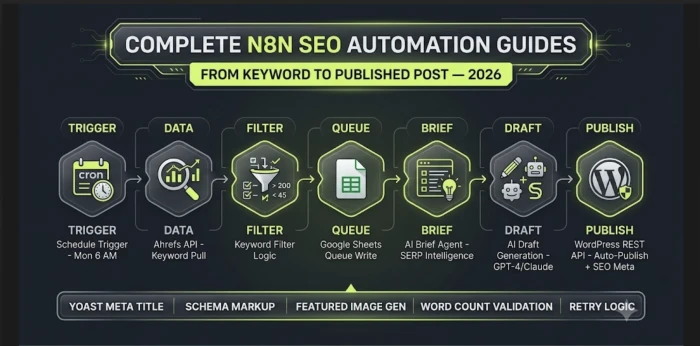
Before building individual nodes, understand the complete architecture. Every stage has one job and one output that feeds the next stage. No stage does more than one thing.
Writimate n8n SEO Pipeline — Node Architecture
SCHEDULE TRIGGER
Cron — Mon 6 AM
→
AHREFS API
HTTP Request
→
KEYWORD FILTER
IF Node + Code
→
GOOGLE SHEETS
Queue Write
→
BRIEF AGENT
AI Node Claude
→
CONTENT DRAFT
AI Node GPT-4
→
WORDPRESS PUBLISH
HTTP Request
Stage
n8n Node Type
Input
Output
Time
1. Trigger
Schedule Trigger
—
Workflow starts
<1s
2. Keyword Pull
HTTP Request Ahrefs
Seed keyword list
Raw keyword + metrics JSON
3–8s
3. Filter + Queue
IF Node + Code + Google Sheets
Raw keyword JSON
Filtered queue row written to sheet
2–4s
4. Brief Generation
AI Agent Claude
Keyword + metrics
Structured content brief
15–30s
5. Draft Generation
AI Agent GPT-4
Content brief
Full HTML article draft
45–90s
6. WordPress Publish
HTTP Request WP REST API
Draft + meta fields
Published post URL
2–5s
7. Quality Gate
IF Node + Error Handler
Each stage output
Slack alert or auto-retry
Continuous
Total pipeline execution time from trigger to published post: 90–150 seconds. That is the gap between this architecture and the 4-hour manual workflow it replaces.
Stage 1: The Schedule Trigger
Open a new workflow in n8n. Add a Schedule Trigger node as your first node. This is the only node that does not receive input from another node — it fires on a time condition and wakes the entire pipeline.
Recommended Trigger Configuration
CONFIG
Schedule Trigger Settings
Mode: Cron Expression | Expression: 0 6 * * 1 | This fires every Monday at 6:00 AM. Start with weekly execution while you validate quality. Increase to daily after your first 10 articles confirm the pipeline output meets your standards.
Do Not Start With Daily Triggers
A daily trigger publishing one article per day on a new domain can look unnatural if the content is not reviewed properly. Start with Monday-only triggers. Add Wednesday later if quality is holding.
Connect the Schedule Trigger to your first HTTP Request node. The trigger passes an empty object {} to the next node — that is intentional and correct. The Ahrefs node pulls its own data and does not need input from the trigger beyond the start signal.
Stage 2: Pulling Keywords from the Ahrefs API
Add an HTTP Request node. This is where most n8n SEO guides stop — they show you how to call Ahrefs and dump the response to a Google Sheet. That is not a pipeline. That is a data export. The difference in this stage is that the output flows directly into the filter node, not into a sheet for someone to review later.
Authentication Setup
Navigate to n8n credentials and create a new HTTP Header Auth credential. Set the header name to Authorization and the value to Bearer YOUR_AHREFS_API_KEY. Name it "Ahrefs API" and save. You will reference this credential in every Ahrefs HTTP Request node.
API Key Security
Store your Ahrefs API key in n8n's credential vault, never in the node parameters directly. If you self-host n8n, also set it as an environment variable in your .env file as a backup. Rotate the key if you ever share workflow exports with anyone.
The Ahrefs Keywords Explorer endpoint returns keyword metrics that help the filter stage decide whether a keyword enters your publishing queue.
Stage 3: Keyword Filtering and Queue Management
Raw Ahrefs output is noise until filtered. This stage is where most people building n8n SEO pipelines make their most consequential mistake: they filter only by keyword difficulty and miss three other signals that determine whether a keyword is worth producing content for.
Connect the Code node to a Google Sheets node. This writes each filtered keyword as a new row in your content queue sheet. The queue sheet becomes your audit trail for every keyword that enters the publishing pipeline.
Why Log to Google Sheets at This Stage
The queue sheet serves as your cannibalization prevention layer. Before the brief generation stage runs, check whether this keyword already exists with status "published". If yes, skip it.
Stage 4: Automated Content Brief Generation
This is where generic n8n content pipelines fail. They send a keyword directly to GPT-4 and ask it to write an article. The output is usually generic because the AI has no information about the specific SERP, competitor content gaps, or the angle that would make the article useful.
The brief generation stage fixes this by doing SERP research programmatically and feeding that intelligence into the AI before any content is written.
SERP Research Node
Add an HTTP Request node that calls your SERP data provider to pull the top 10 results for the target keyword. Extract their titles, meta descriptions, and URLs. This data goes into the brief prompt.
Brief Generation AI Agent
AI Agent — Brief Generation PromptStage 4b Node
You are an expert SEO content strategist.
Output only valid JSON.

Target keyword: {{ $json.keyword }}
Monthly search volume: {{ $json.volume }}
Keyword difficulty: {{ $json.difficulty }}

Produce a JSON brief with:
- target_keyword
- secondary_keywords
- search_intent
- recommended_title
- recommended_h1
- meta_description
- word_count_target
- h2_sections
- must_include_topics
- avoid_topics
- content_angle
- internal_link_target
- faq_questions
Stage 5: AI Draft Generation
With a structured brief available, the draft generation node has everything it needs to produce a strong first draft. This stage uses a separate AI node from the brief generator so you can use one model for strategic analysis and another model for long-form writing.
AI Agent — Draft Generation PromptStage 5 Node
Write a {{ $json.brief.word_count_target }}-word article using this brief.

Title: {{ $json.brief.recommended_h1 }}
Target keyword: {{ $json.brief.target_keyword }}
Secondary keywords: {{ $json.brief.secondary_keywords }}
Angle: {{ $json.brief.content_angle }}

Requirements:
- Include target keyword in first 100 words
- Use clean HTML
- Use h2 and h3 heading hierarchy
- No markdown
- Add FAQ section at the end
Draft Post-Processing
Add a Code node after the draft generator to extract the meta description, clean the content, validate word count, and prepare the final fields WordPress needs.
Stage 6: WordPress Auto-Publishing via REST API
This is the stage many guides cover too quickly. A useful automation should not only create a post. It should send the title, slug, content, status, SEO meta title, meta description, focus keyword, categories, tags, and featured image.
WordPress REST API Authentication
In WordPress admin, go to Users → Your Profile → Application Passwords. Generate a new application password named "n8n Pipeline". Copy it immediately because WordPress shows it only once.
The Complete Publish Node Configuration
HTTP Request — WordPress REST API PublishStage 6 Node
Set the WordPress status to draft until you have reviewed at least your first 20 articles. Human review protects quality, accuracy, and trust.
Featured Image Auto-Generation and Upload
Add two nodes after the publish node. The first generates a featured image based on the article title. The second uploads it to the WordPress Media Library and attaches it to the post.
Stage 7: Quality Gates and Error Handling
A pipeline without error handling is a liability. When it works, it is invisible. When it fails, it may publish a half-formed post, skip a title, or waste API credits in repeated calls.
The Four Quality Gates
GATE 1
Keyword Validation
After Stage 3 filtering, add an IF node. If filtered keyword count equals zero, send a notification and stop workflow execution.
GATE 2
Brief Completeness Check
After Stage 4, validate that all required JSON fields are present. If headings or title are missing, stop the workflow.
GATE 3
Word Count Validation
If draft word count is below 80% of the target, throw an error instead of sending the draft to WordPress.
GATE 4
Publish Confirmation
After Stage 6, verify that the WordPress API returned a post ID and draft status. If not, send the full error payload for manual review.
Prerequisites and Full Cost Breakdown
What You Need Before Building
n8n instance — self-hosted or n8n Cloud.
Ahrefs account — for keyword research API access.
OpenAI API key — for AI draft generation.
Anthropic API key — optional, for brief generation.
SERP data provider — for competitor result analysis.
WordPress site — with REST API enabled.
Google account — for Google Sheets queue management.
Tool
Monthly Cost
Used For
Can Reduce?
n8n self-hosted VPS
$6–12
Workflow execution
No
Ahrefs
$199+
Keyword research API
Yes
OpenAI API
$40–80
Draft generation
Yes
Anthropic API
$15–25
Brief generation
Yes
SERP API
$3–10
SERP data
Yes
Image generation
$8–15
Featured images
Yes
Cost Comparison
A freelance SEO content writer may charge far more per article than this pipeline costs per generated draft. The real value is not only cost reduction, but faster research, faster formatting, and a repeatable publishing system.
What You Have Built
A seven-stage n8n pipeline that starts with a seed keyword list, pulls related keywords, filters opportunities, generates a SERP-informed content brief, produces a structured AI draft, prepares SEO fields, uploads a featured image, and sends the post to WordPress as a draft.
What it does not do: replace editorial judgment. Every draft should still be reviewed by a human before publishing. That is where you add first-hand examples, original insight, fact-checking, and the final quality layer.
Build the pipeline once. Run it every week. Spend your time on the editorial work that automation cannot replace.
Frequently Asked Questions
Do I need coding experience to build this n8n SEO workflow?
You need only basic JavaScript for the Code nodes. If you are not comfortable with code, you can replace some logic with n8n Filter, Set, and IF nodes.
Can I run this pipeline without an Ahrefs subscription?
Yes. You can replace Ahrefs with another keyword source as long as you can access keyword, volume, difficulty, CPC, and intent-related metrics.
Should the pipeline publish posts directly or save them as drafts?
Save them as drafts first. Direct publishing should only happen after you are confident that your prompts, checks, formatting, and review process are reliable.
How many articles per week can this pipeline safely produce on a new domain?
Start slowly. One to three reviewed posts per week is safer than pushing large volumes of lightly reviewed AI content on a new website.
What happens when the keyword API returns no results?
Your quality gate should stop the workflow, send a notification, and prevent the empty result from going into the brief or draft stage.
Does this workflow handle keyword cannibalization automatically?
Partially. A Google Sheets queue can prevent duplicate exact keywords. For semantic duplicates, add a similarity check before brief generation.
WM
Built with Writimate. This article was researched and drafted using the Writimate automated SEO pipeline. Keyword identified from keyword data. Brief generated with AI. Human editorial review added structure, accuracy, and final improvements. Learn more about Writimate →
I am a content writer and AI tools/software enthusiast with a strong interest in creating helpful, well-researched, and easy-to-understand content. I enjoy exploring new AI platforms, SaaS products, productivity tools, and emerging tech trends, then turni